Now available for macOS

Budgeting that
stays on your computer.

A powerful, private desktop app for planning your financial life. Track personal and business budgets, import bank transactions, and see exactly where your money goes.

Free 30-day trial. No account required. No data leaves your machine.

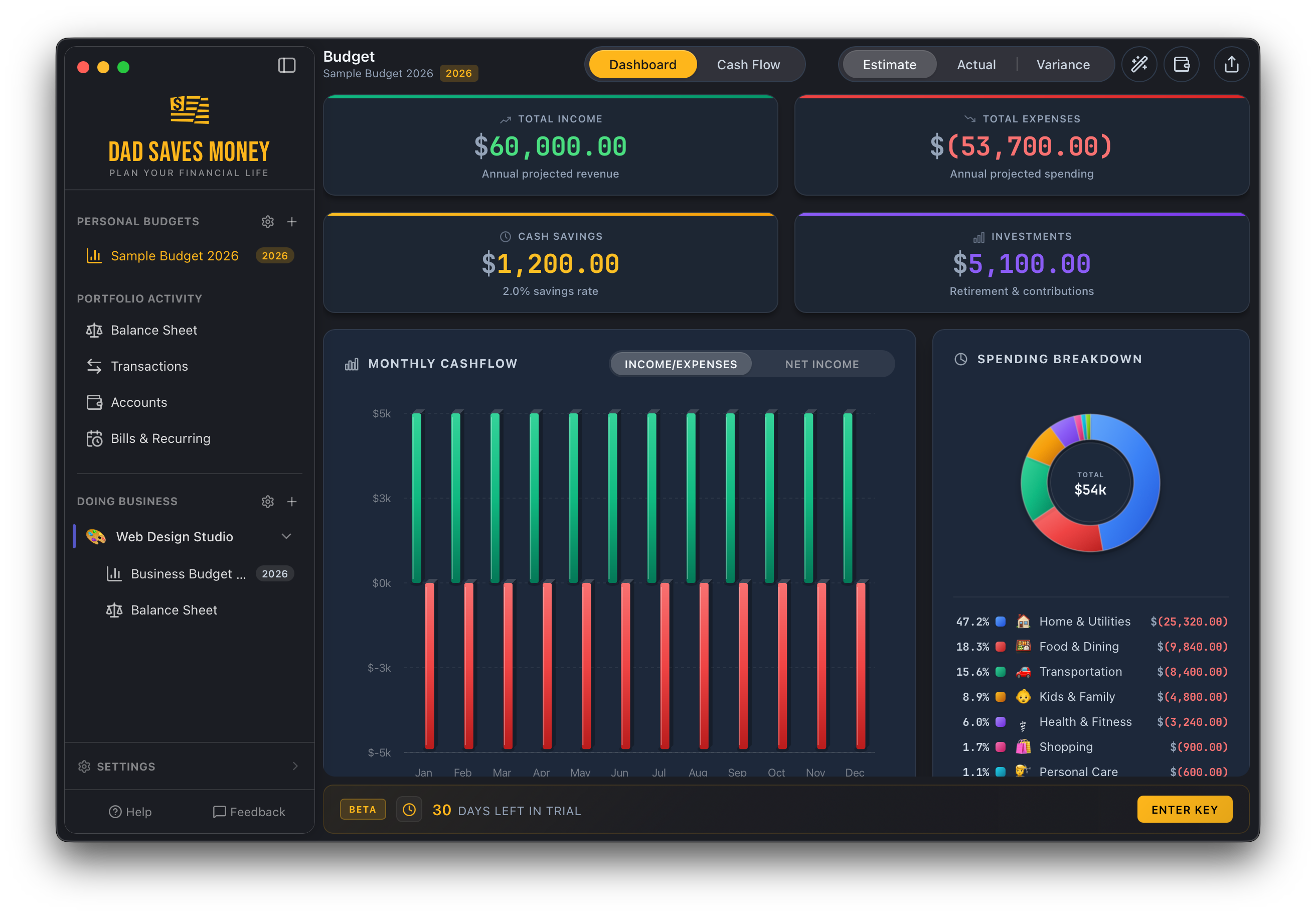
Dad Saves Money dashboard showing budget overview with income, expenses, cash savings, monthly cash flow chart, and spending breakdown
🔒 100% Offline
💻 Native macOS App
💰 One-Time Purchase
💼 Personal + Business
💳 CSV Bank Import

Everything you need.
Nothing you don't.

No subscriptions. No cloud sync. No mysterious third party staring at your bank statements. Just a seriously capable budgeting app that runs right on your desktop.

📈

Visual Dashboard

See your total income, expenses, savings, and investments at a glance. Monthly cash flow charts and spending breakdowns make the big picture crystal clear.

💲

Cash Flow Planning

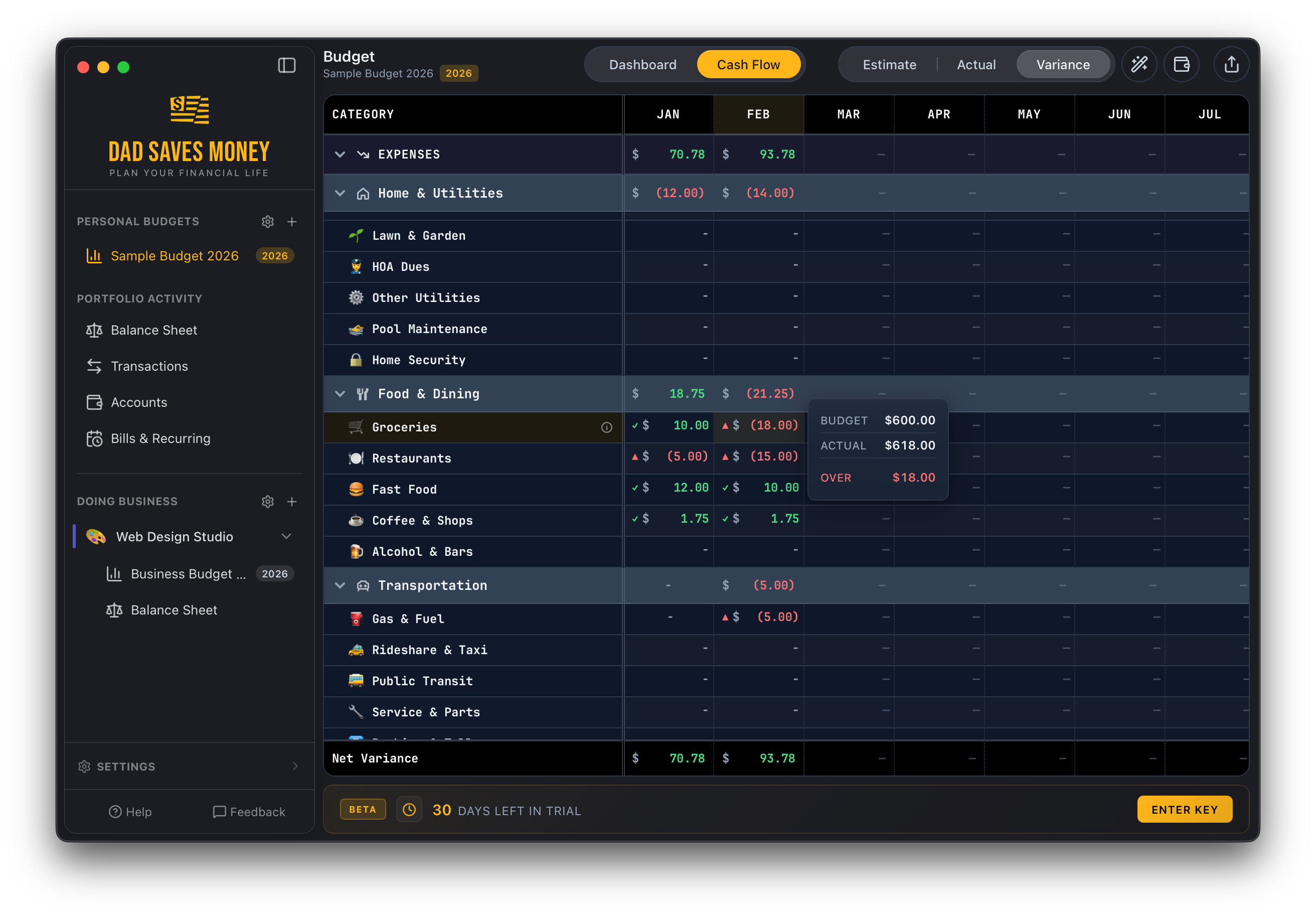
A full 12-month spreadsheet-style cash flow view with Estimate, Actual, and Variance modes. Track every dollar across income and expense categories, month by month.

🧮

Budget Wizard

Build a complete annual budget in minutes. The step-by-step wizard walks you through income, housing, daily living, lifestyle, and investments. No spreadsheet degree required.

💶

Transaction Tracking

Import bank transactions from CSV files, then categorize, rename, and filter them with powerful batch tools. Auto-categorization rules do the boring stuff for you.

📅

Bills & Recurring

Track recurring bills and income with automatic detection from your transactions. See what's due this week and never miss a payment again.

🏢

Business Budgets

Run a side hustle? Freelance? Keep business finances completely separate with dedicated budgets, categories, and balance sheets for each business you manage.

📊

Balance Sheet

Track assets, liabilities, and net worth across all your accounts. See checking, savings, investments, retirement, crypto, and property in one place.

🔒

App Lock

Protect your financial data with a PIN. Because maybe you don't want your kids to know how much you spend on coffee.

💾

Automatic Backups

Set it and forget it. Automatic backups on a schedule you choose, with configurable history retention. Restore anytime, export anywhere.

Your entire financial picture, one screen.

The dashboard gives you the full story in seconds: total income and expenses, cash savings rate, investment contributions, and a month-by-month cash flow chart with spending breakdown by category.

  • Annual income vs. expense overview
  • Monthly cash flow bar chart
  • Category spending donut chart
  • Savings rate at a glance
Budget review showing monthly income, expenses, and net cash flow with a thumbs-up

Know exactly where every dollar went.

The cash flow view is a full 12-month breakdown of every income and expense category. Switch between Estimate, Actual, and Variance modes to compare your plan against reality and spot trouble before it snowballs.

  • Estimate vs. Actual vs. Variance views
  • Budget vs. actual per category with over/under alerts
  • Running cash and bank balance
  • Net income row so you always see the bottom line
Cash flow variance view showing expense categories with budget vs actual comparisons

All your accounts. Every transaction. Total control.

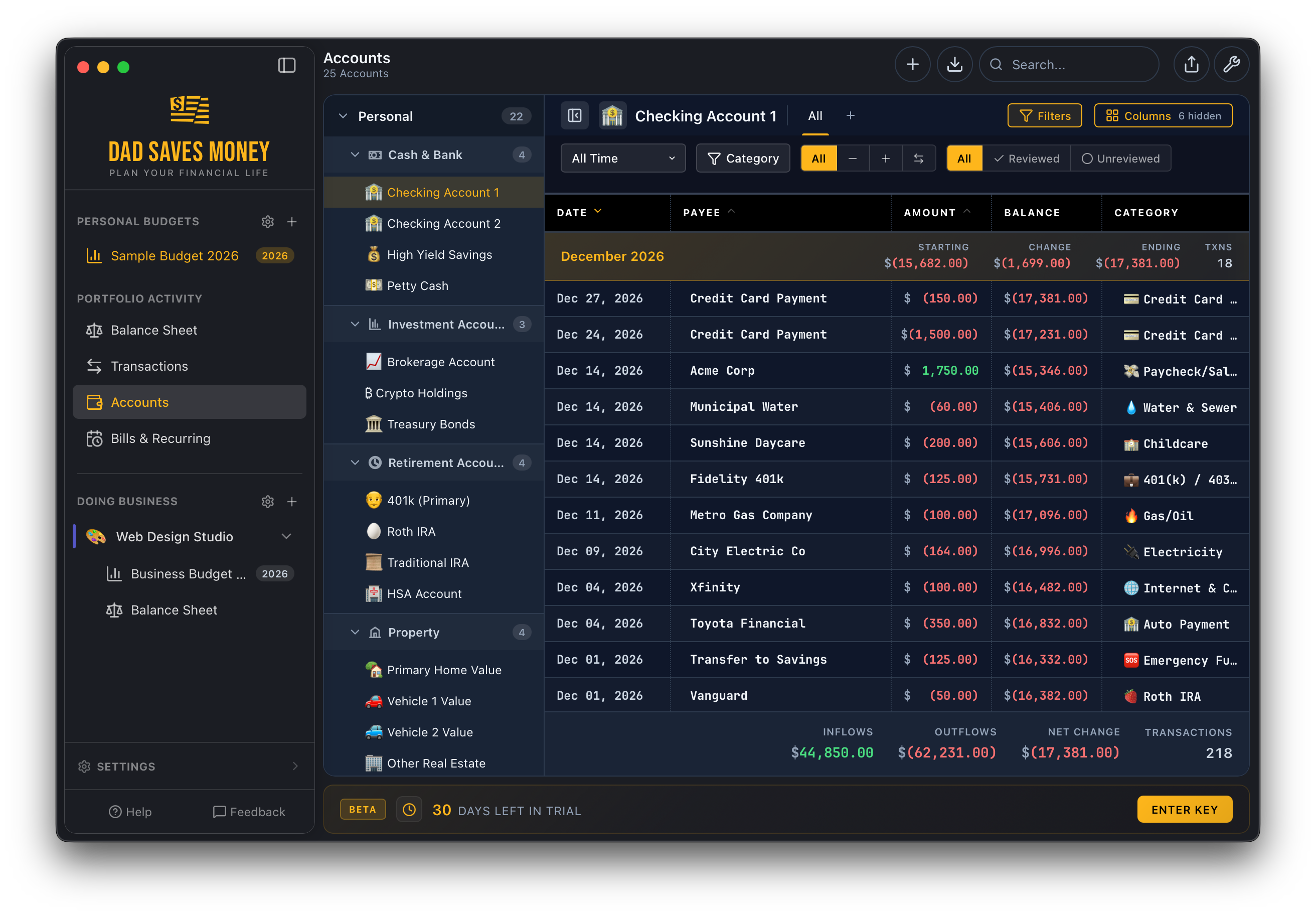
Track checking, savings, credit cards, investments, retirement, crypto, and property accounts. Import transactions via CSV from your bank, then use batch tools to categorize, rename, and review everything in one place.

  • Unlimited accounts of every type
  • CSV import from any bank
  • Batch categorization and renaming rules
  • Filter by date, category, account, or status
Accounts view showing checking, savings, investment, retirement, and property accounts with transactions

Side hustle? Freelance gig? It's got its own budget.

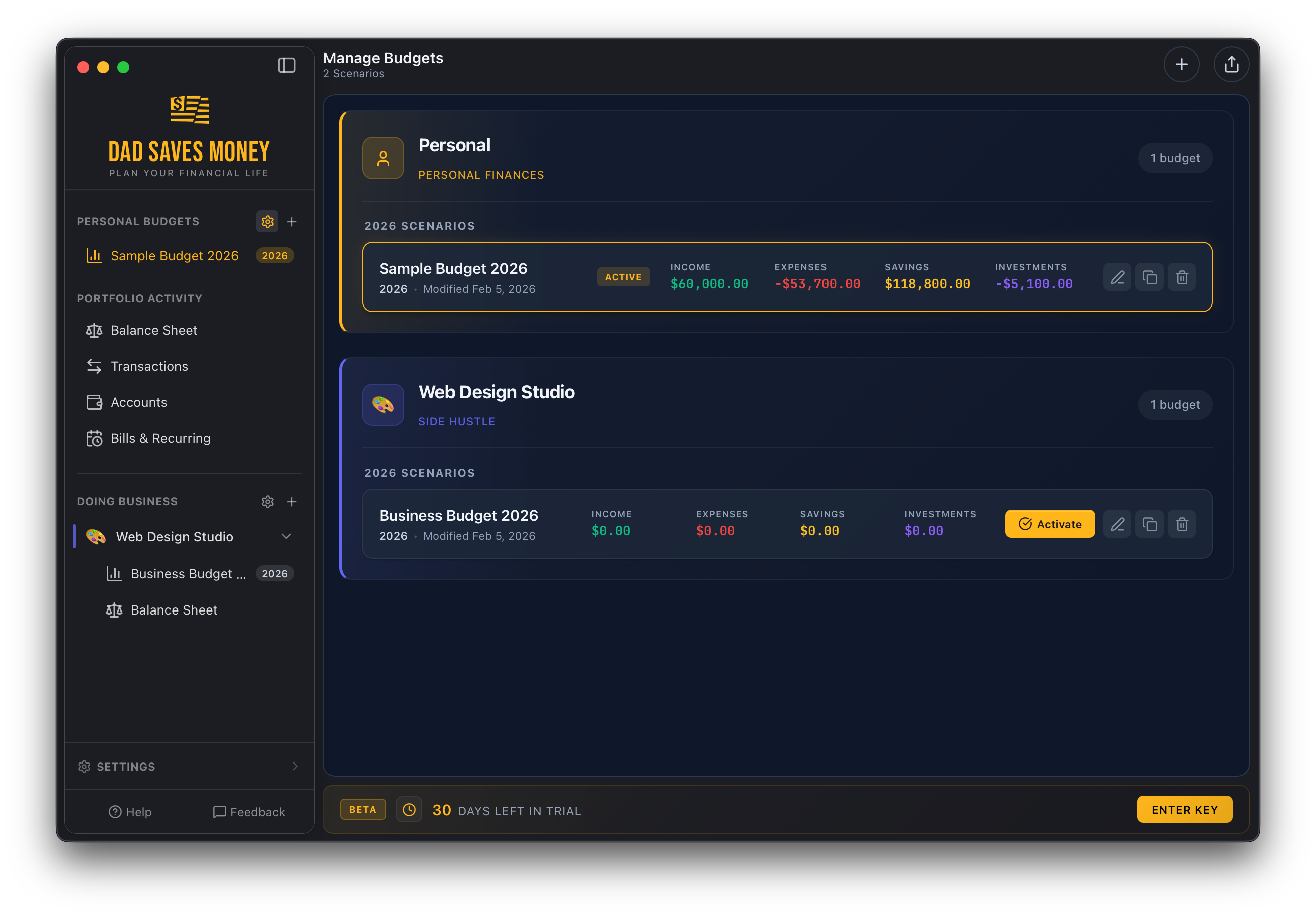
Create separate businesses with their own budgets, categories, cash flow, and balance sheets. Perfect for freelancers, side hustlers, and anyone who needs to keep personal and business money in separate lanes.

  • Separate dashboards per business
  • Business income & expense categories
  • Business balance sheets with assets & liabilities
  • Switch between personal and business views instantly
Manage Budgets view showing personal and business budget scenarios

Up and running in five minutes.

No account creation. No email verification. No "connecting your bank." Just download, open, and start planning.

1

Download & Open

Install the app. No account, no sign-up, no cloud. It runs on your Mac and that's it.

2

Build Your Budget

The Budget Wizard walks you through income, housing, food, lifestyle, and investments step by step.

3

Import Transactions

Download a CSV from your bank and import it. Auto-rules help categorize everything fast.

4

Track & Adjust

Compare estimates to actuals, spot overspending, and adjust your plan as life happens.

Your money data
never leaves your machine.

Dad Saves Money is 100% local. No cloud. No servers. No telemetry. Your financial data is stored on your computer and nowhere else. Period.

In a world where every app wants to "connect to your bank" and upload your life to someone's server, this one just... doesn't. Your data is yours.

🔒 No cloud storage
🔐 No account required
📡 No data collection
💻 Runs fully offline
💾 Local backups you control
🛡 Optional PIN lock
🛡️
Your data. Your computer. That's it.

One price. No subscriptions. Ever.

Try it free for 30 days. If you like it, buy it once and it's yours forever. No monthly fees, no upsells, no "premium tiers."

Free Trial

$0
for 30 days
  • Full access to every feature
  • Personal + business budgets
  • Unlimited transactions
  • CSV import & auto-categorization
  • No credit card required
Start Free Trial

Questions? We've got answers.

Does this connect to my bank?

Nope. You download CSV files from your bank's website and import them into the app. It's one extra step, but it means your login credentials never touch a third party.

Is there a Windows version?

Not yet, but it's on the roadmap. Right now Dad Saves Money is a native macOS app. Sign up for updates and we'll let you know when Windows is ready.

What happens after the trial?

After 30 days, the app asks for a license key. Your data is never deleted. Purchase a license, enter the key, and pick up right where you left off.

Can I track multiple budgets?

Absolutely. Create separate budgets for different years or scenarios. You can also create separate businesses, each with their own budgets, categories, and balance sheets.

What types of accounts can I track?

Checking, savings, credit cards, petty cash, brokerage, crypto, treasury bonds, 401(k), Roth IRA, Traditional IRA, HSA, property, vehicles, and more.

Is my data safe?

Your data lives on your computer and nowhere else. The app includes automatic backups with configurable frequency and history retention, plus manual backup and restore at any time.

Start saving like a dad today.

Download the free trial and build your first budget in five minutes. No account. No credit card. No data leaves your machine.

Requires macOS 14 or later. 30-day free trial. ~15 MB download.